
Engineering Records · 3D Printing & CAD Prototyping
Designing a Stackable Workshop Drawer System
Developing a modular drawer system around printable size, stacking, storage density, and eventually real printed tolerances.
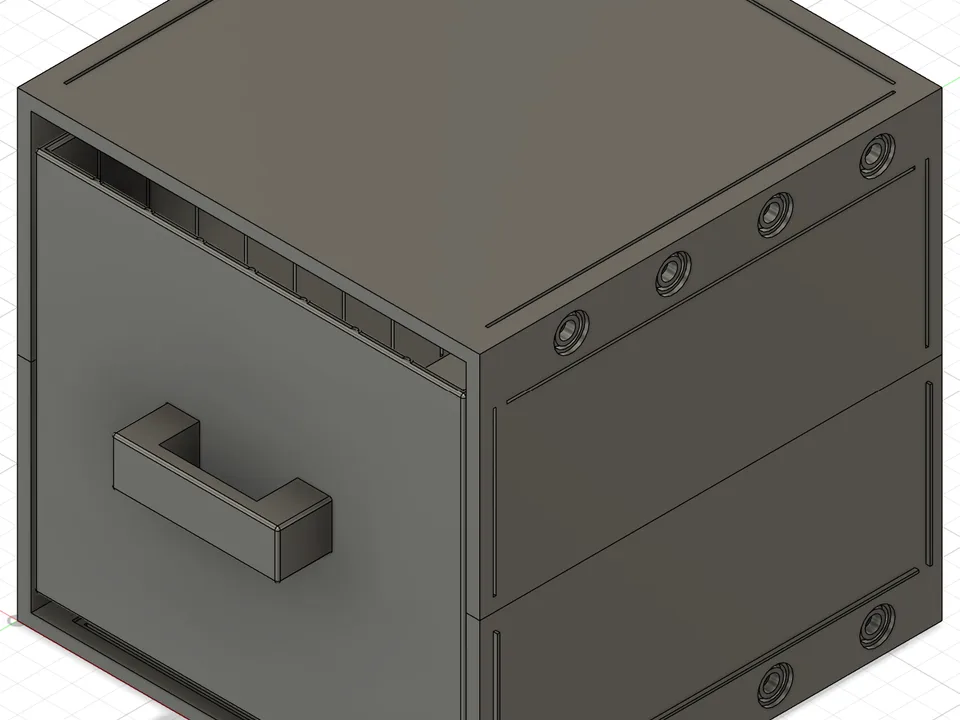
Stackable Drawer V1
The first complete CAD version of the modular workshop drawer system.
As my electronics and 3D printing supplies started taking over more of my workspace, I wanted to try designing the storage around the things I actually use.
The basic idea is a modular drawer system that can grow with the workspace while still being printable on the A1 Mini.
This is still an active V1 design.
What I Want the System to Do
I don’t want this to become one giant storage unit.
I’d rather have individual modules that work on their own and can also become part of a larger system.
That means the design needs to support both vertical and horizontal expansion without every possible arrangement becoming its own completely separate CAD model.
The basic module needs to stay consistent enough that future pieces still fit with the older ones.
The First Complete Model
The first version uses an outer frame with a removable drawer inside it.
The frame defines the overall module size while the drawer slides through geometry built into the inside of that frame.
Even at this stage, the design has several competing requirements.
The frame needs to be strong enough to stack.
The drawer needs useful interior volume.
The whole thing needs to stay inside the A1 Mini’s build volume.
And I don’t want to use a huge amount of filament just making thick solid walls.
Separating the Frame From the Drawer
Looking at the frame without the drawer made the modular part of the design easier to think about.
The outside shape needs to become the common interface between units.
If I eventually make different drawer heights, organizers, open bins, or other storage modules, I want them to still make sense as part of the same system.
The Rail Problem
The drawer rail is one of the parts I don’t want to pretend is finished just because it looks correct in CAD.
Two perfectly mating CAD surfaces don’t necessarily make two good printed surfaces.
The rail needs enough clearance to slide smoothly, but too much clearance will make the drawer feel loose.
Layer lines, material, print orientation, and printer tolerances can all affect the result.
This is something that needs a physical test rather than more guessing on the screen.
Designing Around the A1 Mini
The printer is again becoming part of the design.
Each module has to fit inside the 180 × 180 × 180 mm build volume.
The advantage is that several of those smaller modules could eventually create a storage system much larger than the printer itself.
That’s the same general idea I used with the spool holder, but applied to something that needs to remain modular instead of becoming one fixed assembly.
Current Status
This is still a V1 CAD concept.
The basic module exists and the rail geometry is far enough along to start testing, but I have not validated the complete drawer system physically yet.
The next useful step isn’t another polished render.
It’s printing the critical interfaces, measuring what actually happens, and revising the model from there.